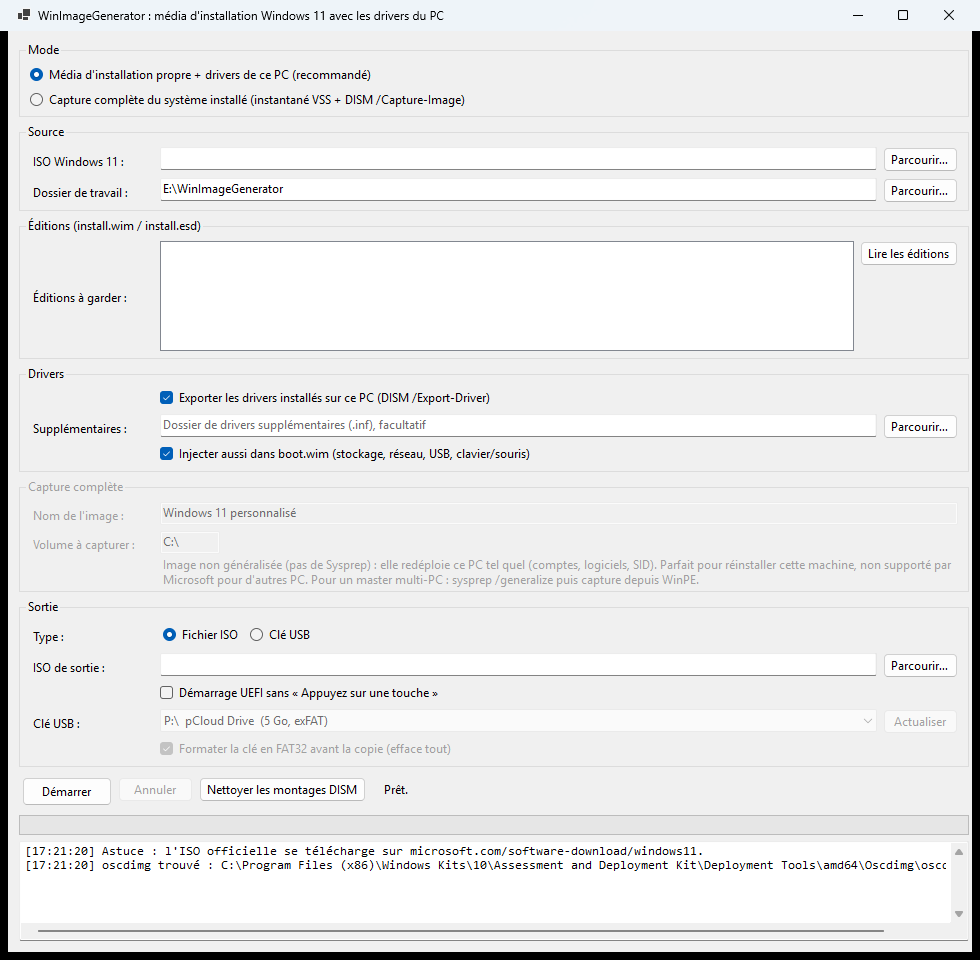
WinImageGenerator is a Windows desktop tool that builds a Windows 11 installation media with the current PC’s drivers already included. The result is a clean install where the disk, network, chipset, USB and audio all work right away, with no driver hunting afterwards.
The main window is organised top to bottom:
Mode: choose between a clean installation media with this PC’s drivers (recommended) and a full capture of the installed system (VSS snapshot + DISM /Capture-Image).
Source: the official Windows 11 ISO and a working folder.
Editions: reads the editions in the ISO (Home, Pro…) so you keep only the ones you need.
Drivers: exports every third-party driver installed on the PC, can add an extra driver folder, and optionally injects the storage, network, USB and input drivers into boot.wim, so the installer sees the SSD from the first screen.
Full capture: image name and the volume to capture, with a warning that the image is not generalized.
Output: a bootable ISO (BIOS + UEFI, via oscdimg) or a USB drive. The USB drive can be formatted to FAT32, and install.wim is split automatically if it is larger than 4 GB.
Progress and log: Start, Cancel and “Clean up DISM mounts” buttons, a progress bar and a live log. At the end, a report lists anything that could not be included.

Browse more projects in the portfolio
View all projects